Audit File
Audit File consists of the following basic and advance tabs
| Tab | Purpose | Scope |
|---|---|---|
| Basic Info | All header level basic info such as title, audit type, audit period, the audit file preparer, audit file reviewer, etc are entered in basic info tab. | Basic part of all audit files. |
| Audit Program | It contains a list of audit tasks and its assignee and reviewer, these tasks can be fetched from a template and or added line by line. Once all the tasks are done and reviewed the audit program is marked as complete. An audit file cannot be closed unless the associated audit program is complete. | Basic part of all audit files |
| Queries | The queries raised during the course of audit and its resolution can be tracked in Queries tab. Audit file cannot be closed unless all associated audit queries are closed. | Basic part of all audit files |
| Issues | The complications encountered during a course of audit that may need wider consultation within the audit team can be tracked in the Issue tab. Audit file cannot be closed unless all associated audit issues are closed. | Basic part of all audit files |
| Checklist | Audit checklist consists of questionnaire that enable the audit team to ensure that all required points are covered. Checklists can be fetched from a template or added line by line. Audit program is focused on what needs to be done whereas audit checklist guides on how to execute specific aspects of audit. Audit file cannot be closed unless all associated audit checklists are closed. | Needs to be enabled for specific audit file |
| Sampling Info | The sampling method and coverage of sampled items can be tracked in the sampling info tab. | Needs to be enabled for specific audit file |
| Client Sensitization | Communication with Lead Communicator - Auditor and Team Lead Communicator - TCWG Team | Needs to be enabled for specific audit file |
| Documents | The storage path or URL of various documents forming the working papers are organized in the document tab. The access to these documents are controlled by the security settings of the audit firms cloud storage platform. This enables easy retrieve of the working papers along with maintaining its confidentiality. | Needs to be enabled for specific audit file |
| Audit evidence | Analysis of audit evidence against applicable auditee's assertions can be done in the audit evidence tab. This enables the auditor to ensure that appropriate and sufficient evidences are available to support the audit opinion. | Needs to be enabled for specific audit file |
| Effort Monitoring | Record of effort related to Effort Category,Resource Type,Budgeted Hrs,Actual Hrs,Variance Hrs | Needs to be enabled for specific audit file |
| Audit Opinion | The rationale of concluding on any emphasis of matter or on any qualification, etc are tracked in the audit opinion tab. | Needs to be enabled for specific audit file |
Creating an Audit File
Pre-requisite: Client
Note: Preparer can send for review, and the Reviewer will approve or reject.
Create Audit File
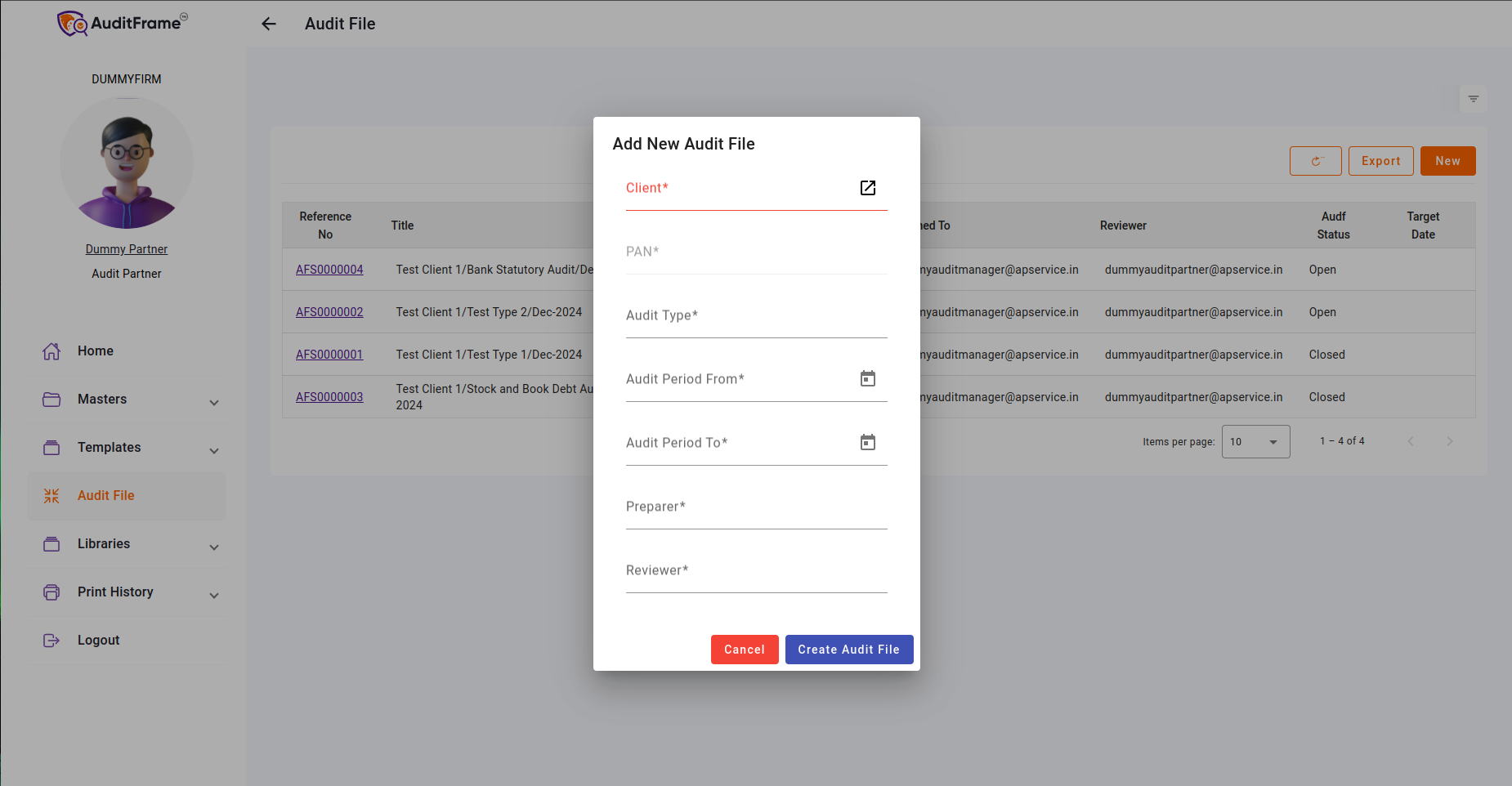
Fill in the Basic Information to create an Audit File.
Key Points to Note When Creating an Audit File:
- Preparer and Reviewer cannot be the same person.
- Target Date should be greater than 'Audit Period To'.
- Audit File should be unique for each Audit Firm.
Note: Only Audit Manager and Audit Partner can create an audit file.
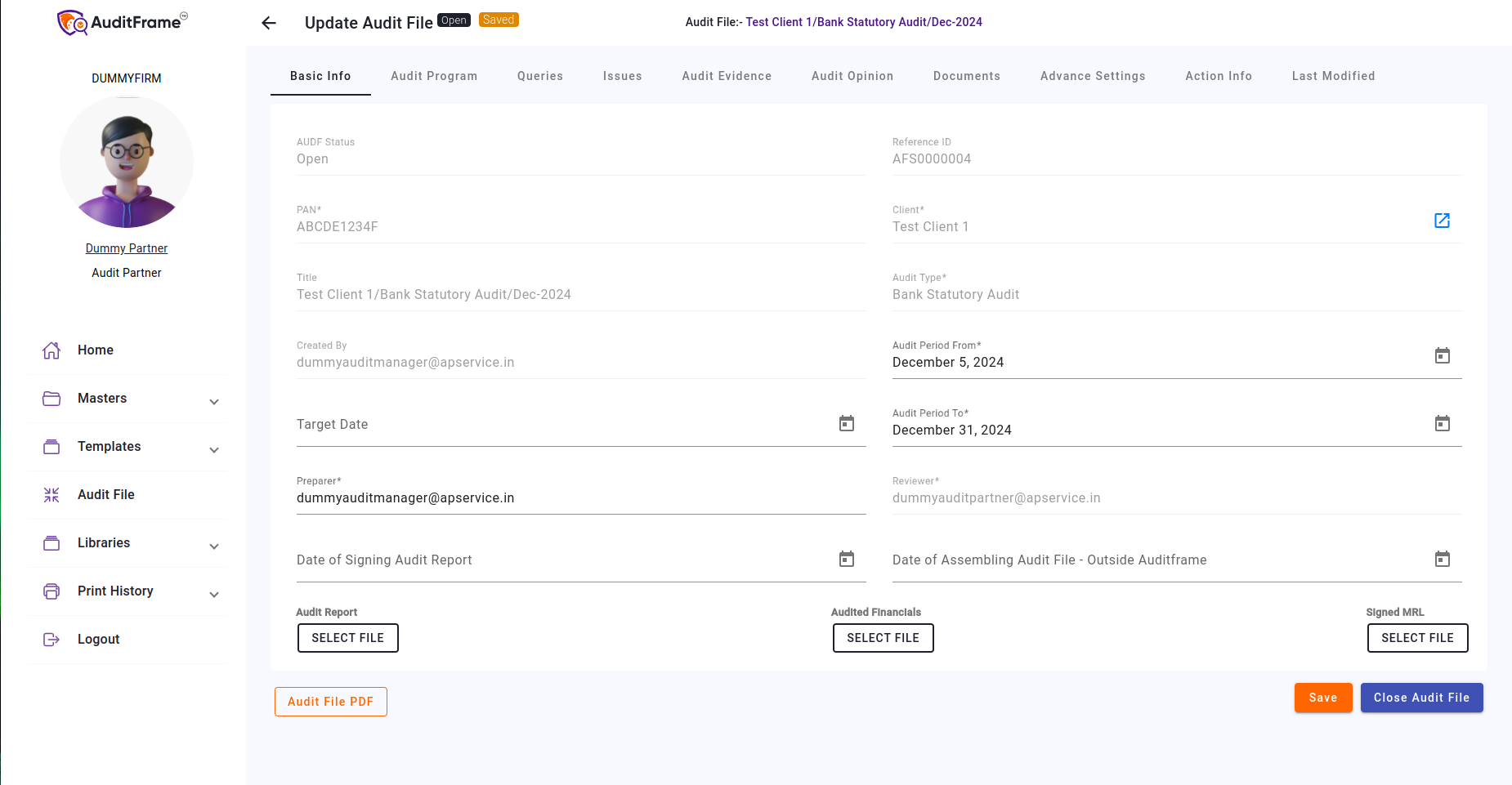
Basic Info Permissions
| Feature / Field | Creator | Engagement Partner | Preparer | Notes |
|---|---|---|---|---|
| AUDF Status | Disabled(Read-Only) | Disabled(Read-Only) | Disabled(Read-Only) | |
| Reference ID | Disabled(Read-Only) | Disabled(Read-Only) | Disabled(Read-Only) | |
| PAN | Disabled(Read-Only) | Disabled(Read-Only) | Disabled(Read-Only) | |
| Client | Disabled(Read-Only) | Disabled(Read-Only) | Disabled(Read-Only) | |
| Title | Disabled(Read-Only) | Disabled(Read-Only) | Disabled(Read-Only) | |
| Audit Type | Disabled(Read-Only) | Disabled(Read-Only) | Disabled(Read-Only) | |
| Created By | Disabled(Read-Only) | Disabled(Read-Only) | Disabled(Read-Only) | |
| Audit Period From | Disabled(Read-Only) | Enabled | Disabled(Read-Only) | |
| Target Date | Disabled(Read-Only) | Enabled | Disabled(Read-Only) | |
| Audit Period To | Disabled(Read-Only) | Enabled | Disabled(Read-Only) | |
| Audit File Preparer | Enabled | Enabled | Disabled(Read-Only) | |
| Engagement Partner | Enabled | Disabled(Read-Only) | Disabled(Read-Only) | |
| Date of Signing Audit Report | Disabled(Read-Only) | Enabled | Disabled(Read-Only) | Hidden |
| Date of Assembling Audit File- Outside AuditFrame | Disabled(Read-Only) | Enabled | Disabled(Read-Only) | Hidden |
Audit Program
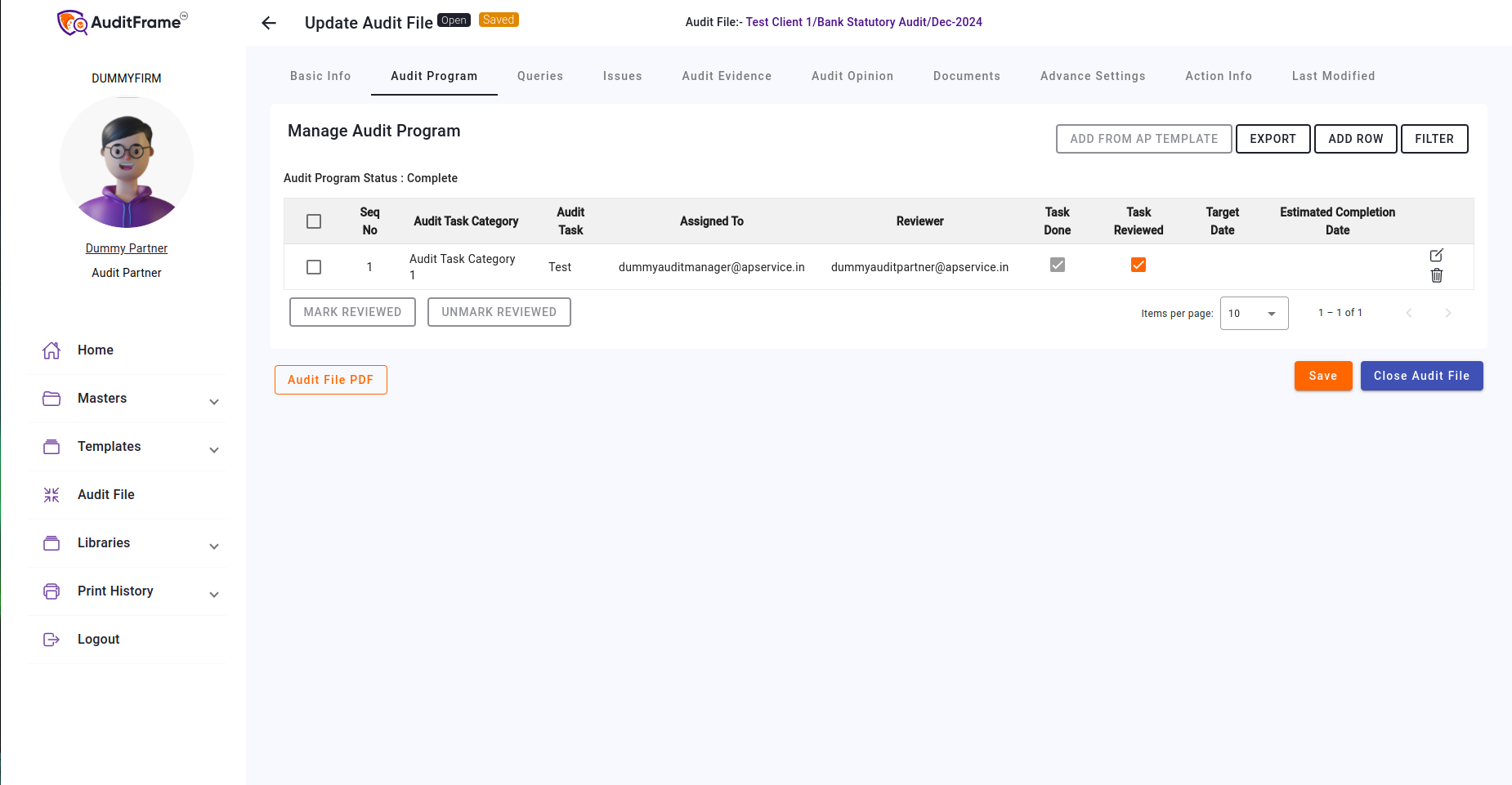
Here you can directly import the audit program using the "ADD FROM AP TEMPLATE" button.
Note:
* "ADD FROM AP TEMPLATE" will only be visible if there is no Audit Program
in the table.
* It will be added in background so you can check Progress in Background
Jobs Tab
* Audit Program needs to be marked as done then only it can be marked as
reviewed
Audit Program Permissions
| Feature / Field | Creator | Engagement Partner | Preparer | Notes |
|---|---|---|---|---|
| Audit Program Add from AP Template Button | Hidden | Visible | Visible | Table should be empty |
| Audit Program Import Button | Hidden | Visible | Visible | |
| Audit Program Add Row Button | Hidden | Visible | Visible | |
| Audit Program Export Button | Visible | Visible | Visible | |
| Audit Program Filter Button | Visible | Visible | Visible | |
| Audit Program Edit Row Button | Hidden | Visible | Visible | Also Visible For Task Assigned To |
| Audit Program Delete Row Button | Hidden | Visible | Hidden | |
| Audit Program Task Done Checkbox | Disabled(Read-Only) | Disabled(Read-Only) | Enabled | Also Enabled For Task Assigned To |
| Audit Program Seq No Edit Popup | Hidden | Visible | Visible | |
| Audit Program Assigned To Edit Popup | Hidden | Visible | Visible | |
| Audit Program Audit Task Reviewer Edit Popup | Hidden | Visible | Visible | |
| Audit Program Task Reviewed Checkbox | Disabled(Read-Only) | Enabled | Disabled(Read-Only) | Also Enabled For Task Reviewer |
| Audit Program Target Date Edit Popup | Hidden | Visible | Visible | Also Visible For Task Assigned To |
| Audit Program Estimated Completion Date Edit Popup | Hidden | Visible | Visible | Also Visible For Task Assigned To |
| Audit Program Sr No Checkbox | Disabled(Read-Only) | Enabled | Enabled |
Queries
In the Queries section, users can add their queries.
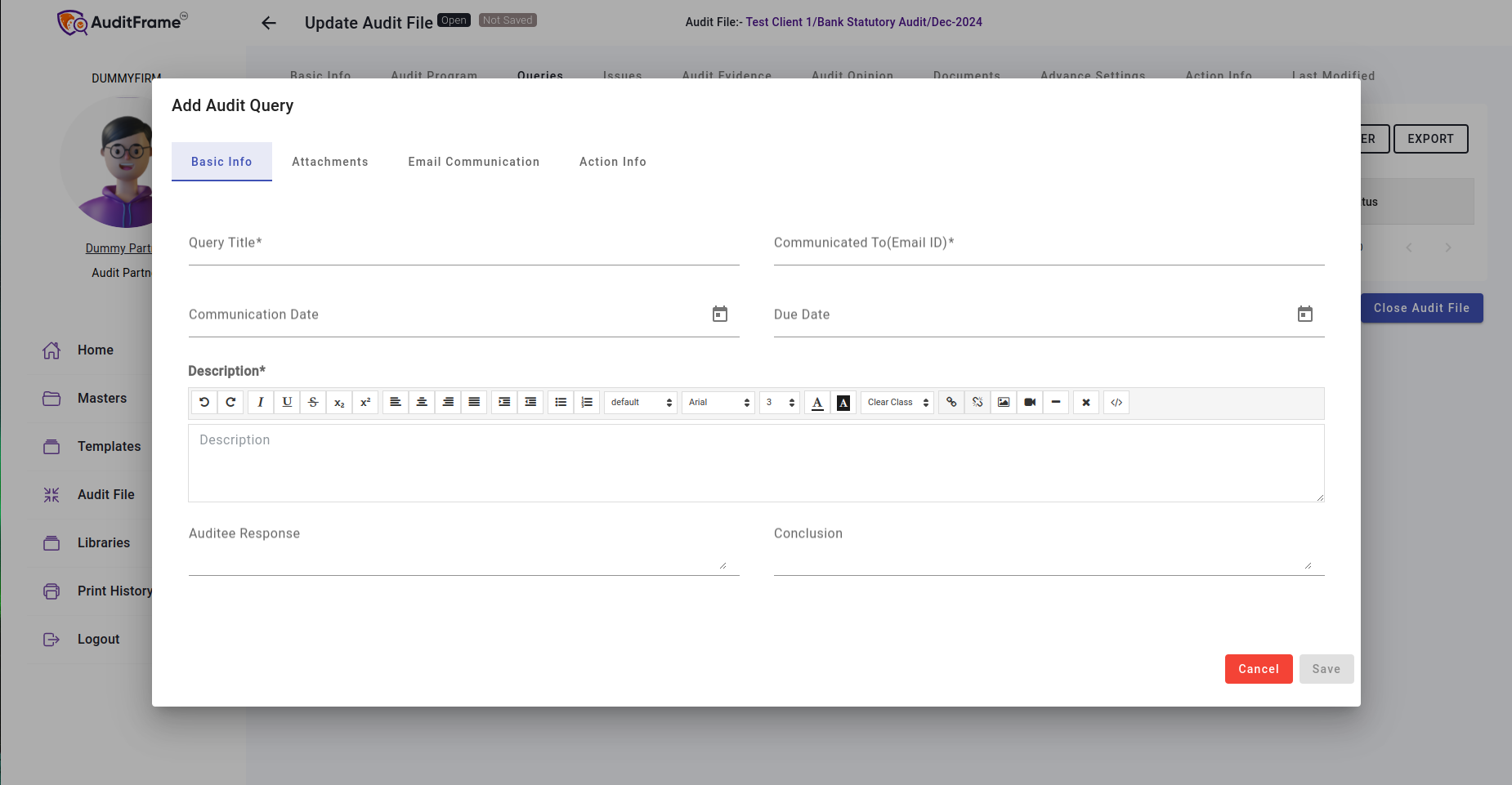
Query Permissions
| Feature / Field | Creator | Engagement Partner | Preparer | Notes |
|---|---|---|---|---|
| Query Add Row Button | Disabled(Read-Only) | Enabled | Enabled | |
| Query Filter Button | Visible | Visible | Visible | |
| Query Export Button | Visible | Visible | Visible | |
| Query Edit Button | Hidden | Visible | Visible | Only Visible for Checklist Users if Checklist is Associated |
Issues
In the Issues section, users can add their issues.
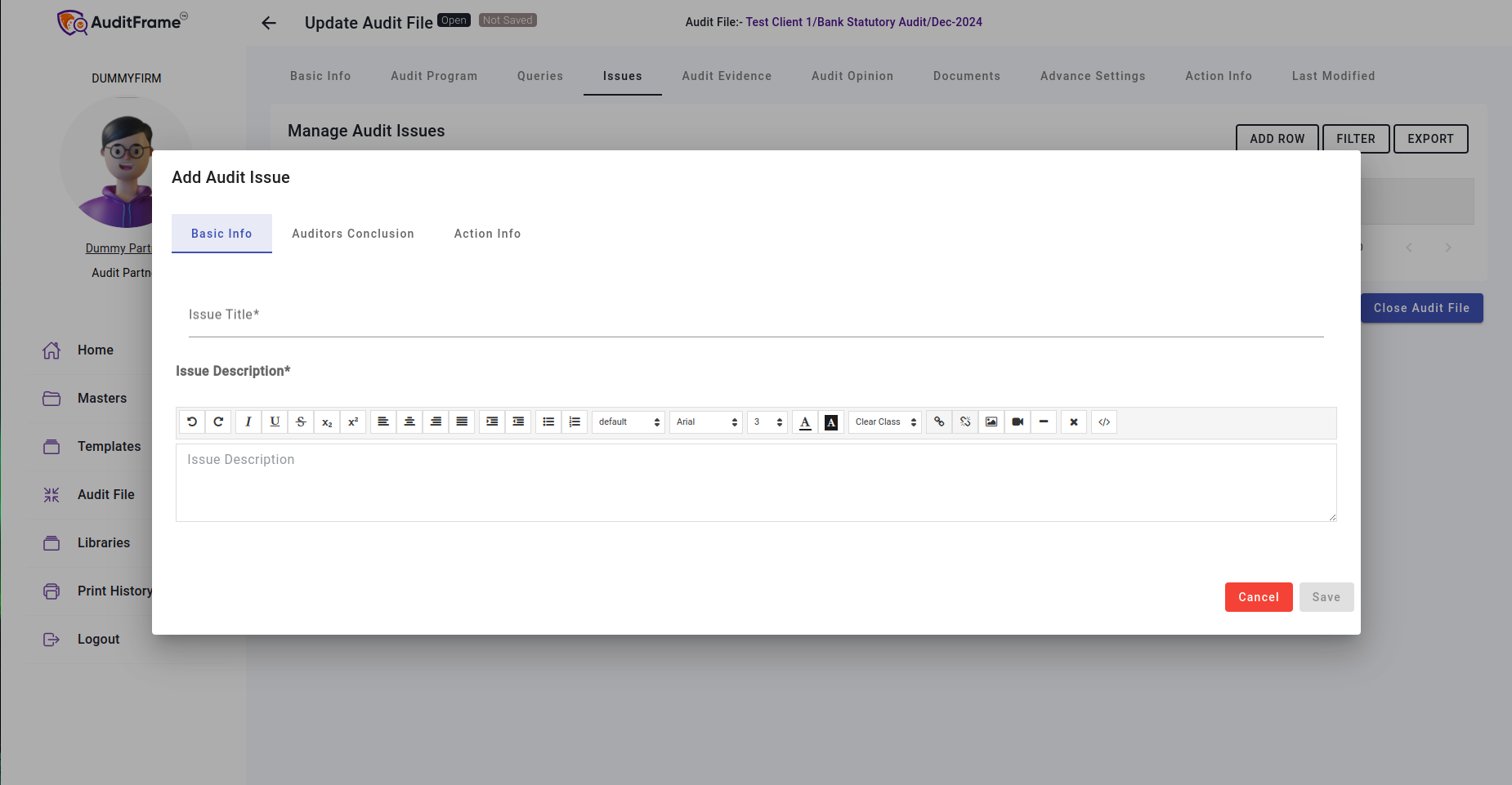
Issue Permissions
| Feature / Field | Creator | Engagement Partner | Preparer | Notes |
|---|---|---|---|---|
| Issue Add Row Button | Disabled(Read-Only) | Enabled | Enabled | |
| Issue Filter Button | Visible | Visible | Visible | |
| Issue Export Button | Visible | Visible | Visible | |
| Issue Edit Button | Hidden | Visible | Visible | Only Visible for Checklist Users if Checklist is Associated |
Audit Opinion
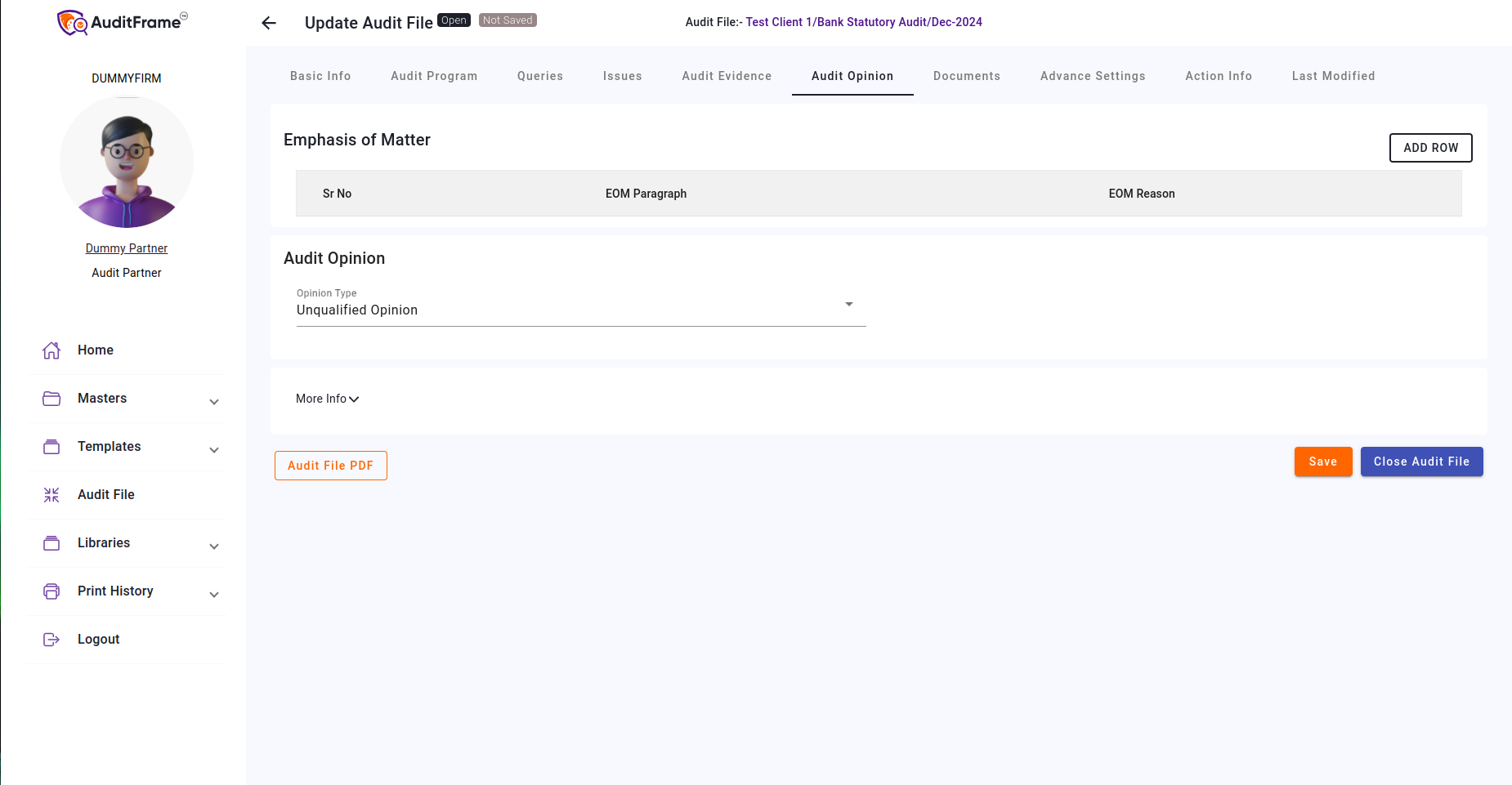
In the Audit Opinion section, the Audit Partner can add their opinion. Other users can only edit additional information.
Sampling Info
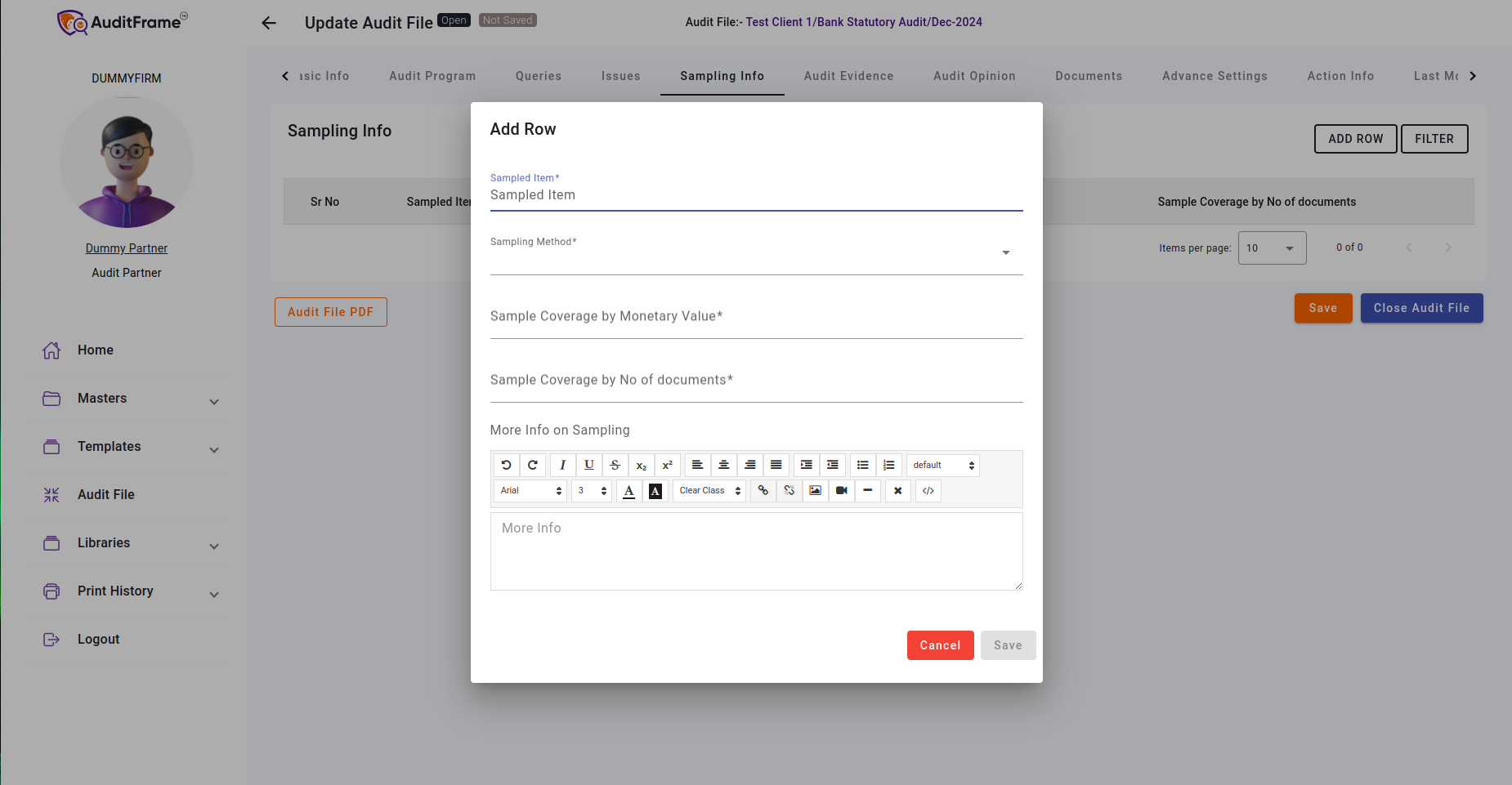
In the Sampling Info section, users can add sample information, such as monetary values.
Client Sensitization
Here we can add Communication record between Lead Communicator - Auditor Team and Lead Communicator - TCWG Team.

Documents
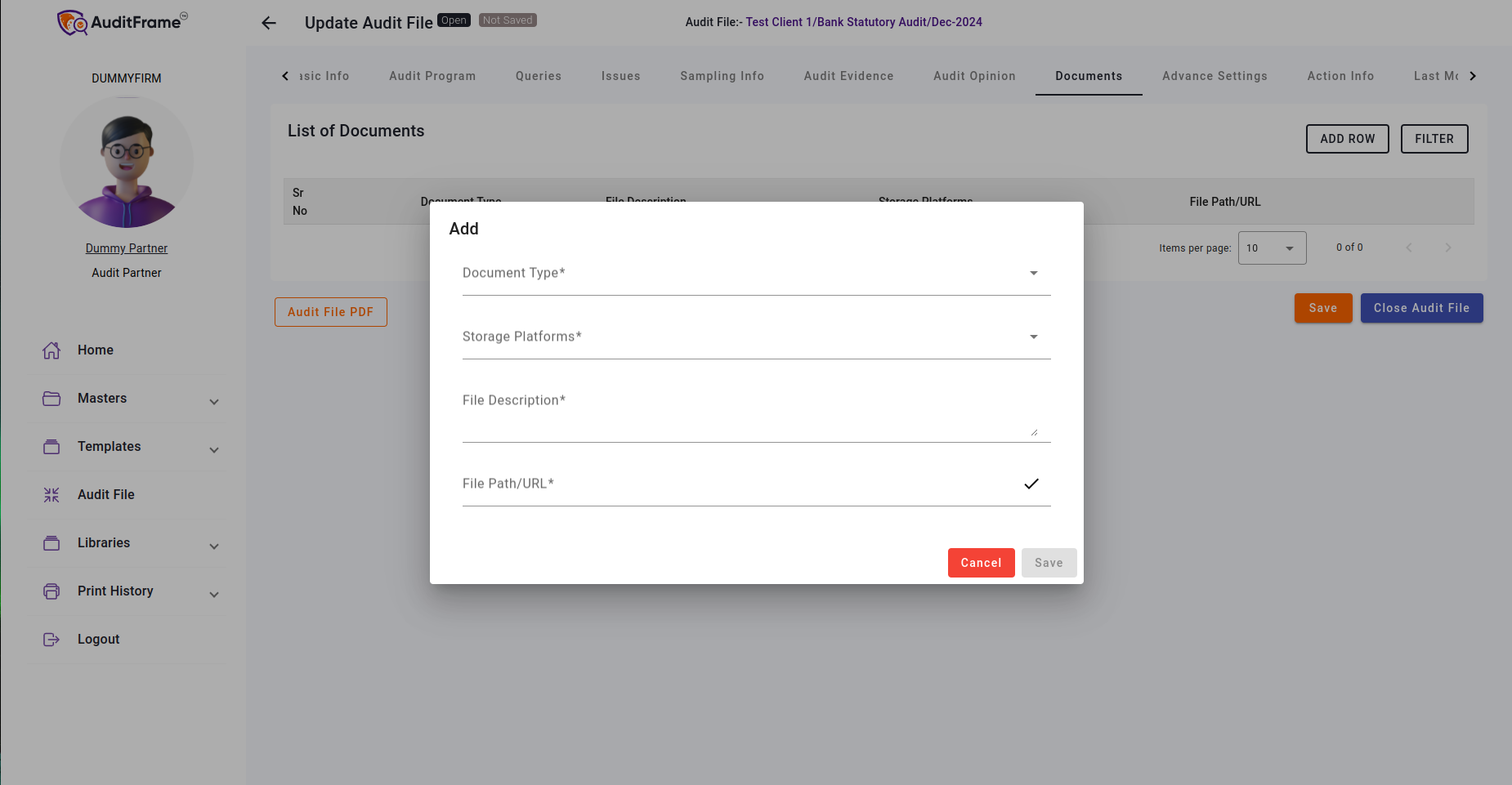
In the Documents section, users can add document information.
Note: Document URL format should be correct according to its storage platform.
Advanced Settings
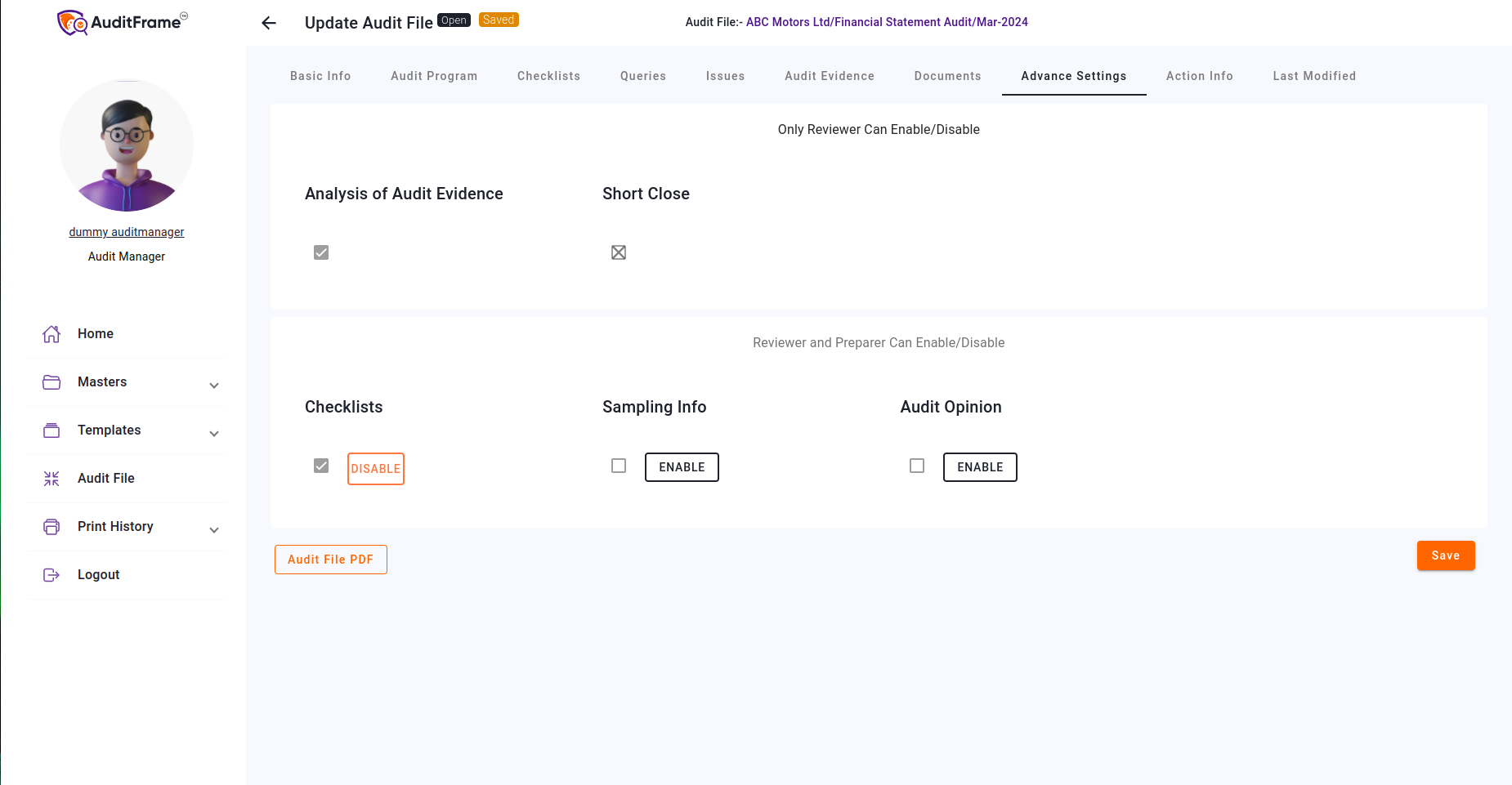
In Advanced Settings, the Audit Reviewer and Partner can enable or disable options.
Options Information
- Analysis of Audit Evidence: Enables the audit evidence tab.
- Basic Checklist: Enables the checklist tab with Basic Checklist.
- Short Close: Allows the audit file to be short-closed when enabled.
- All Checklists:Enables Extensive Checklist.
- Sampling Info:Enables Sampling Info tab.
- Audit Opinion:Enables Audit Opinion tab.
- Effort Monitoring:Enables Effort Monitoring tab.
- Client Sensitization:Enables Client Sensitization tab.
- Audit File Workflow:Apply Audit File Workflow.
- Checklist Workflow:Apply Checklist Workflow.
- ROMM FS Item:Enables ROMM FS Item.
- ROMM Overall:Enables ROMM Overall.
- PBC:Enables PBC.
Audit Evidence
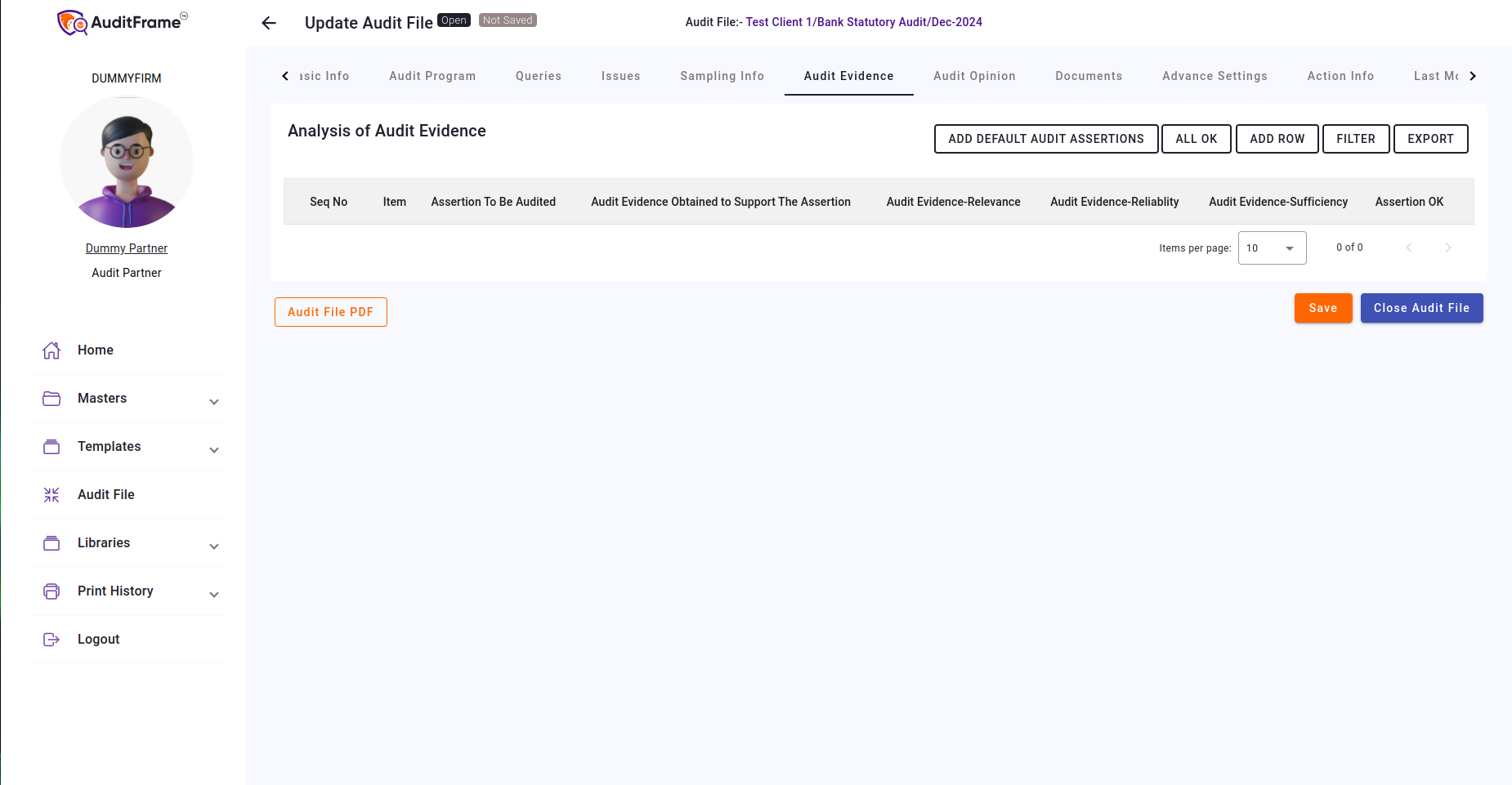
In the Audit Evidence section, users can add evidence along with its related information.
- Reviewers can add and approve evidence.
- Reviewers can add default audit evidence/assertions from the "Add Default" button.
Effort Monitoring
Here we can add Effort Category,Resource Type,Budgeted Hrs,Actual Hrs,Variance Hrs.

Checklist
Both the Preparer and Reviewer can add checklists to the audit file.
The checklist can be added from the "Add Checklist" button.
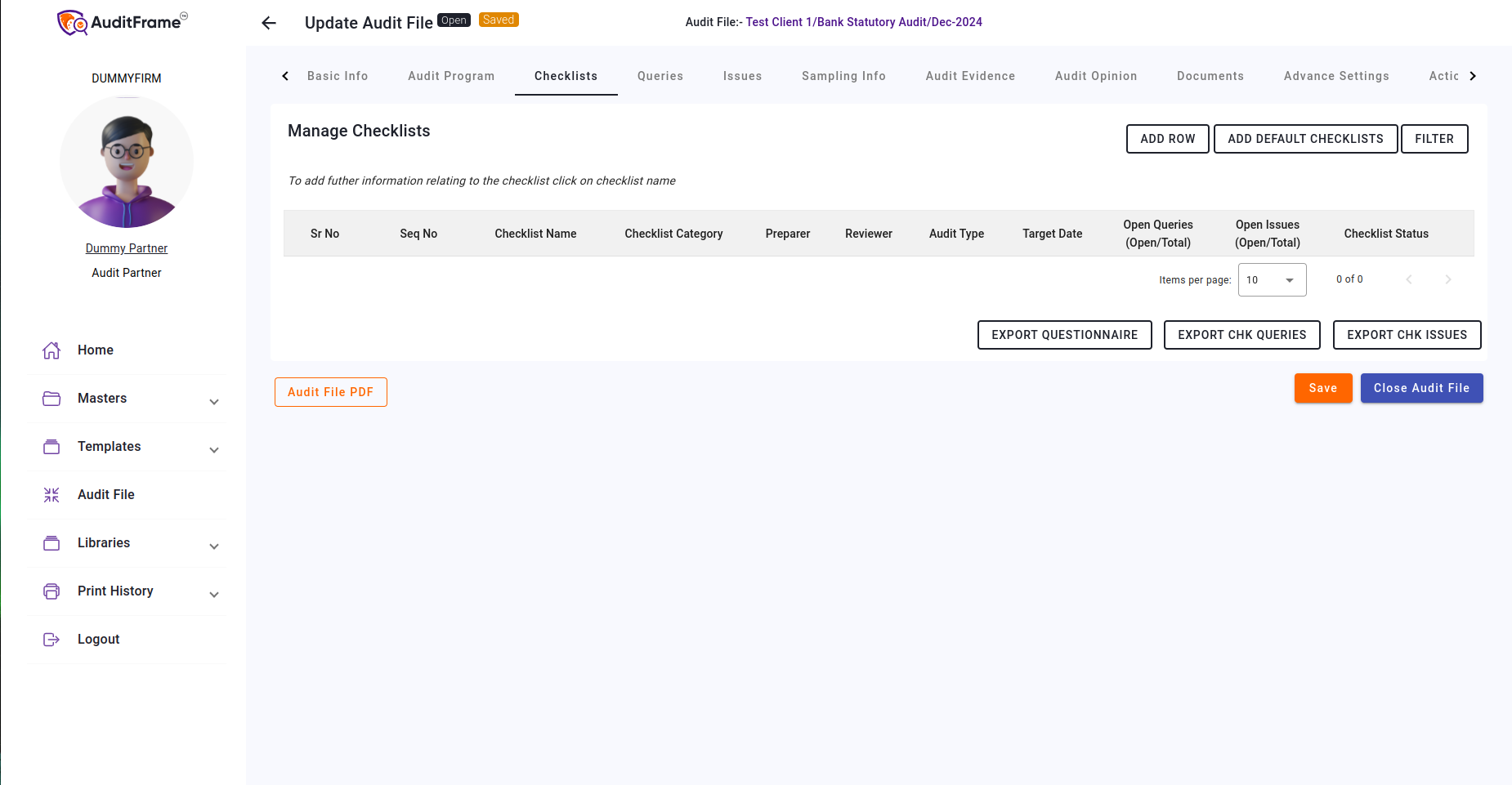
Note: To add the Extensive Checklist, you must first enable it in the Advanced Settings. Additionally, the Basic Checklist must also be enabled.
Checklist Permissions
| Feature / Field | Creator | Engagement Partner | Preparer | Notes |
|---|---|---|---|---|
| Checklist Delete Button | Hidden | Visible | Visible | |
| Checklist Add Checklists Button | Hidden | Visible | Visible | At least One Checklist is Selected |
| Checklist Add From Meta Template Button | Hidden | Visible | Visible | Hidden For Audit Staff |
| Checklist Filter Button | Visible | Visible | Visible | |
| Checklist Sr No Checkbox | Disabled(Read-Only) | Enabled | Enabled | |
| Checklist Seq Code Edit Popup | Hidden | Visible | Hidden | |
| Checklist Preparer Popup | Hidden | Visible | Hidden | |
| Checklist Reviewer Popup | Hidden | Visible | Hidden | |
| Checklist Edit Button | Hidden | Visible | Visible | Hidden If Chkl Status is Approved, Rejected or Closed |
| Checklist Delete Button | Hidden | Visible | Visible | Hidden If Chkl Status is Approved, Rejected or Closed |
| Checklist Import Button | Hidden | Visible | Visible | |
| Checklist Export Questionnaire Button | Visible | Visible | Visible |
ROMM FS Items
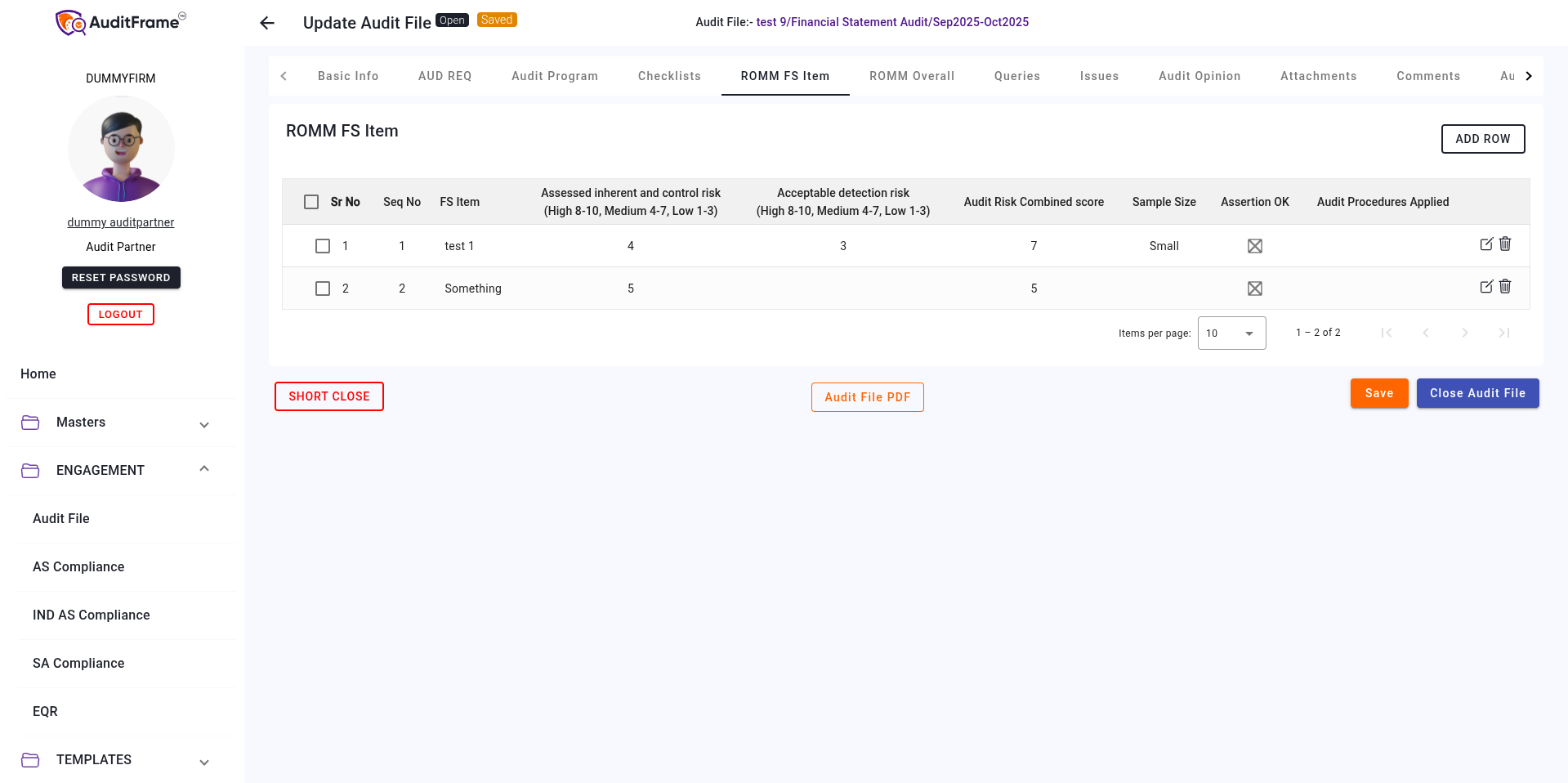
Here we can add FS Items and its assessment.
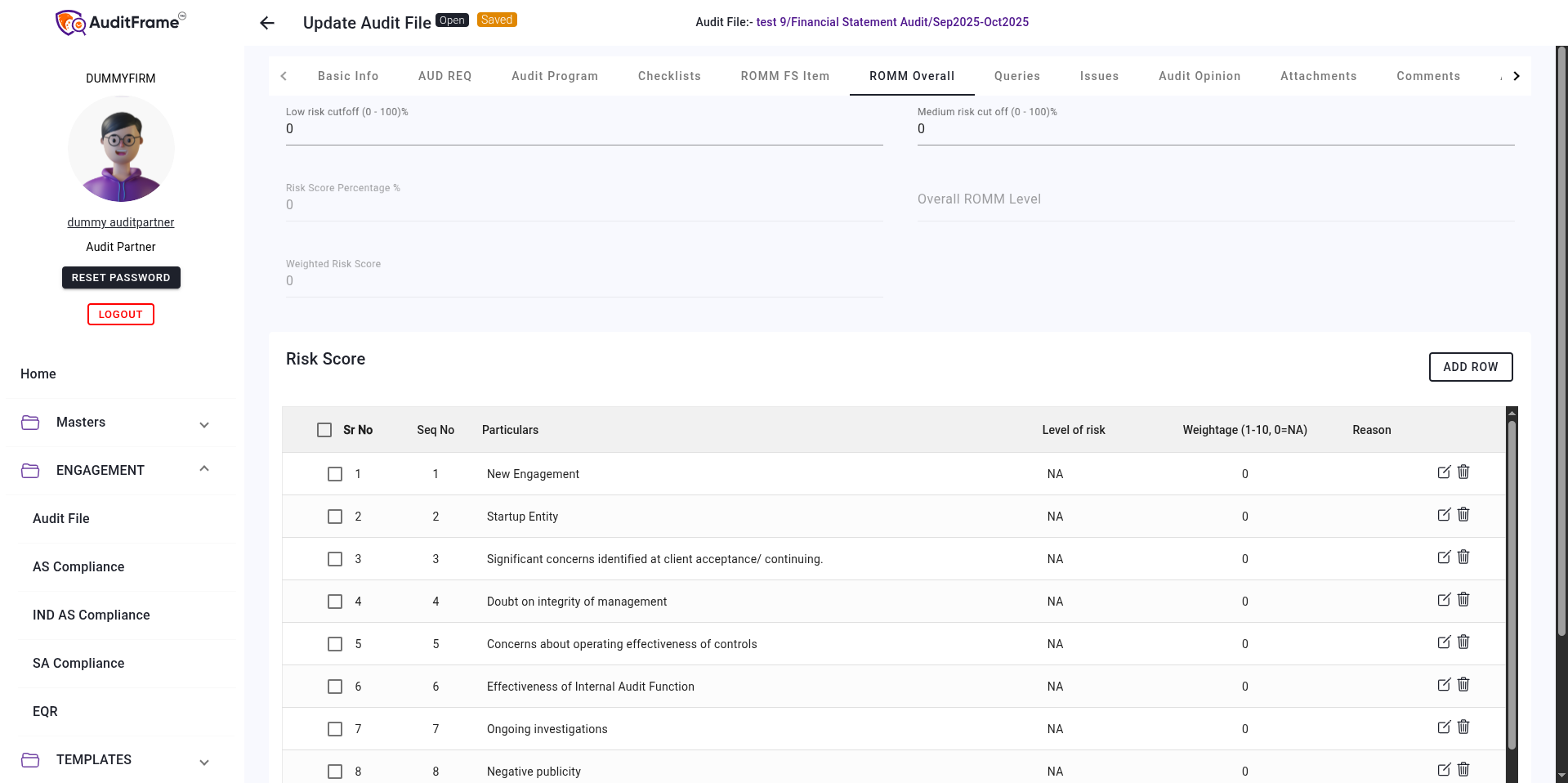
ROMM Overall
Here we can call calculate ROMM with risk score.
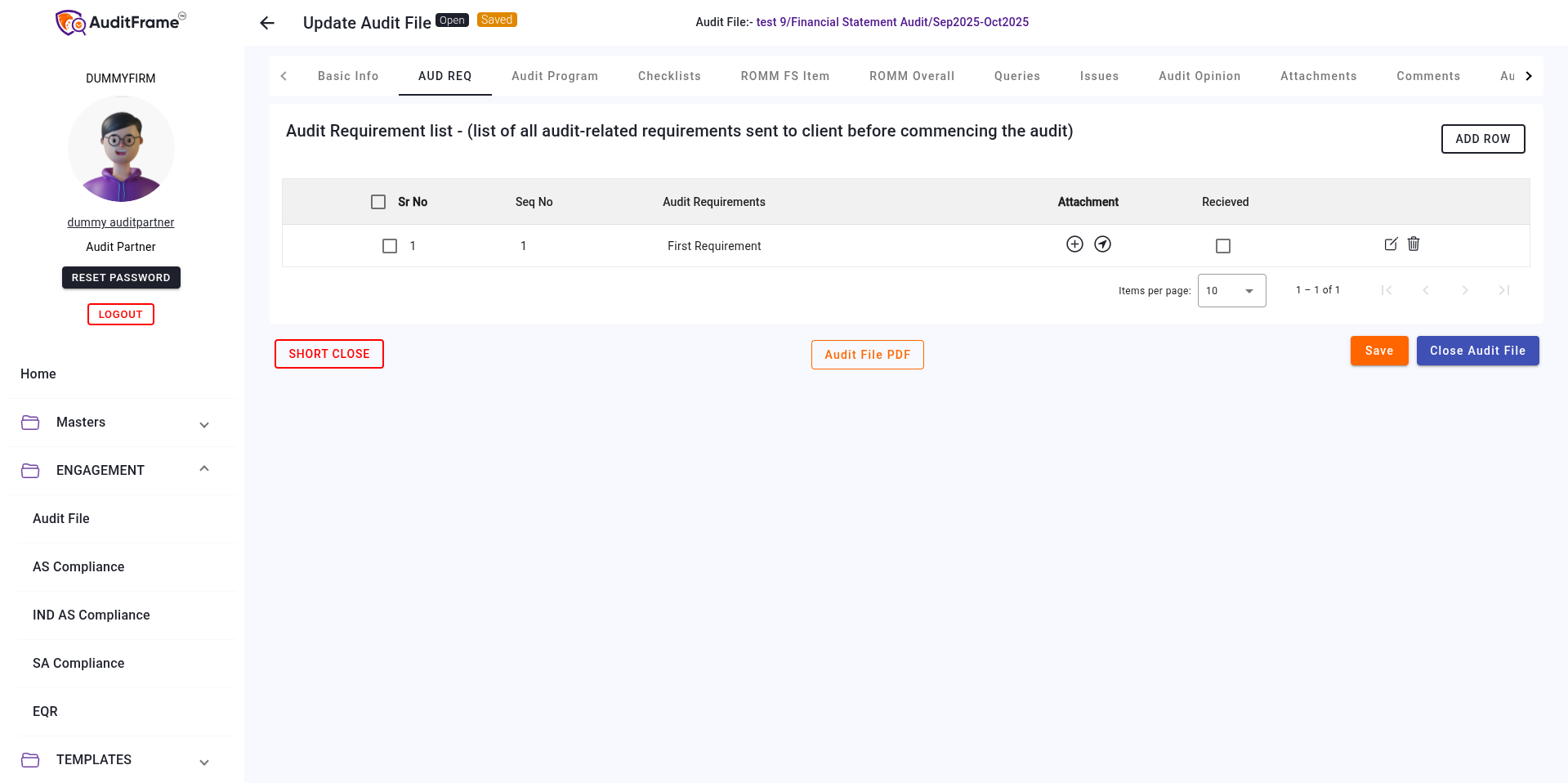
PBC
Here we can audit requirements with attachments and its received or not status.
Audit Objectives
Here we can audit related objective.

PBC List
Here we can add requirements Provided by client.

Background Jobs
In this tab user can check progress of background task progress

Closing an Audit File
Button and it's Purpose
| Button | Purpose |
|---|---|
| Audit Report Select File | Select File for uploading Audit Report |
| Engagement Letter Select File | Select File for uploading Engagement Letter |
| Audited Financial Select File | Select File for uploading Audited Financial |
| Signed MRL Select File | Select File for uploading Signed MRL |
| Audit File PDF | Saving Audit File Details as a PDF |
| Add From AP Template | Add Audit Tasks from associated AP Template |
| Update Assignee | To Bulk Update Assignee by selecting multiple rows |
| Mark Reviewed | Mark Selected Audit Tasks Reviewed |
| Un-mark Reviewed | Mark Selected Audit Tasks not Reviewed |
| Mark Done | Mark Selected Audit Tasks Done |
| Un-mark Done | Mark Selected Audit Tasks not Done |
| Audit Program - Export | Export Audit Program Details as excel file |
| Audit Query Export | Export Audit Query Details as excel file |
| Audit Issue Export | Export Audit Issue Details as an Excel File |
| Checklist - Delete | To Perform Bulk Delete by selecting multiple Rows |
| Add Default Checklists | Add All Checklists For Associated Checklist Category with selected Reviewer and Preparer |
| Export Questionnaire | Export Questionnaires of Associated Checklists as an Excel File |
| Export CHK Queries | Export Audit Queries Associated to Checklists in Audit File as an Excel File |
| Export CHK Issues | Export Audit Issues Associated to Checklists in Audit File as an Excel File |
| Close Audit File | Close Current Audit File |
| Send for Review | Sends Current Audit File for Review |
| Approve | Approve Audit File |
| Reject | Reject Audit File |
Error You May Get
| Error Message | Remedial Action |
|---|---|
| Audit File cannot be Short Closed because enable short closed is not checked | Check the "Enable Short Close" option to allow the Audit File to be short closed. |
| Only Reviewer Can Short Close | Contact the assigned reviewer to short close the Audit File. |
| Only Reviewer Can change Enable Short Close Button | Request the assigned reviewer to enable or disable the Short Close option. |
| Only Reviewer Can change Enable Checklist Checkbox | Only the reviewer can enable or disable the checklist; contact them for any changes needed. |
| Only Reviewer and Creator Can change Preparer | Contact the Reviewer or Creator of the Audit File to make changes to the Preparer. |
| Only Creator Can change Reviewer | Only the creator of the Audit File can assign a different reviewer. |
| Please provide a reason for the rejection. | Enter a reason for rejecting the Audit File to proceed. |
| Only Reviewer Can Close | Contact the assigned reviewer to close the Audit File. |
| Only Assignee Can Submit For Review | Ensure that the assignee submits the Audit File for review. |
| Only Reviewer Can Approve | Contact the assigned reviewer for approval of the Audit File. |
| Only Reviewer Can Reject | Only the reviewer has permission to reject the Audit File; reach out to them for action. |
| Cannot Disable Audit Evidence because Audit Evidence Table is not empty | Clear the Audit Evidence Table before disabling Audit Evidence. |
| Cannot disable checklists as there are one or more Checklist added to the Audit File | Remove all associated checklists from the Audit File before attempting to disable them. |
| Audit File should be unique for an Audit Firm. | Ensure that the Audit File name is unique within the Audit Firm. |
| File URL must start with 'https://' for storage platforms other than LAN. | Update the File URL to start with 'https://' for platforms that are not on LAN. |
| Preparer and Reviewed By cannot be same | Assign a different person to either the "Preparer" or "Reviewed By" role to avoid conflicts. |
| Target Date should be greater than 'Audit Period To' | Ensure the target date falls after the "Audit Period To" date. |
| Reviewer Should be Audit Partner in Audit File | Assign an Audit Partner as the Reviewer for the Audit File. |
| Audit Period To Should be before Audit Period From | Correct the date so that "Audit Period To" is later than "Audit Period From". |
| Could not add or update audit tasks as the combination of audit area '{item}' and sub heading title '{assertion_to_be_audited}' already exists. | Check the audit area and subheading title to avoid creating duplicate combinations. |
| Could not add or update audit tasks as the combination of audit area '{audit_area_title}' and sub heading title '{sub_heading_title}' already exists. | Ensure there are no duplicate combinations of audit area and subheading title in the tasks. |
| In Audit File '{self.title}', Audit Area '{missing_audit_area_list}' is linked to the following Checklist(s):'{missing_checklist_list}'. The Audit Program have at least one task associated with the audit area '{missing_audit_area_list}' | Verify the Audit Program tasks linked to the audit area and ensure the required checklists are complete. |
| Sample Coverage by Monetary Value must be between 1 and 100 in row | Set the sample coverage by monetary value within the range of 1 to 100. |
| Sample Coverage by No of documents must be between 1 and 100 in row | Set the sample coverage by the number of documents within the range of 1 to 100. |
| Audit Type is disabled | Enable the Audit Type to proceed with the Audit File. |
| One or more audit tasks in the audit program is not marked as complete | Mark all audit tasks as complete before finalizing the Audit File. |
| Qualification' table is required when 'opinion_type' is 'Qualified Opinion' | Add entries to the "Qualification" table if the "opinion_type" is set to "Qualified Opinion". |
| Audit Evidence Table cannot be Empty if Analysis of Audit Evidence is Enabled | Add relevant data to the Audit Evidence Table if "Analysis of Audit Evidence" is enabled. |
| If Unqualified Opinion is selected and Analysis of Audit Evidence is enabled then Eligible for Unqualified Opinion in Audit Evidence Tab should be checked | Check "Eligible for Unqualified Opinion" in the Audit Evidence tab when both conditions apply (Unqualified Opinion and Analysis enabled). |
Audit Query Related Error
| Error Message | Remedial Action |
|---|---|
| Cannot create or update query as user is not associated to checklist | Ensure the user is associated with the relevant Checklist before creating or updating the query. |
| Audit Queries cannot be created since checklist is closed. | Reopen the Checklist if modifications are necessary, or ensure the Checklist is active before creating a query. |
| Cannot create or update query as user is not associated to audit file | Confirm that the user is associated with the relevant Audit File before creating or updating the query. |
| Conclusion should be mandatory on submit | Provide a conclusion before submitting the Audit Query. |
Audit Issue Related Error
| Error Message | Remedial Action |
|---|---|
| Cannot create or update issue as user is not associated to checklist | Ensure the user is associated with the relevant Checklist before creating or updating the issue. |
| Cannot create or update issue as user is not associated to audit file | Confirm that the user is associated with the relevant Audit File before creating or updating the issue. |
| Conclusion should be mandatory on submit | Provide a conclusion before submitting the Audit Issue. |
Global Actions & File Operations
Permissions regarding the overall management of the Audit File.
| Feature / Field | Creator | Engagement Partner | Preparer | Notes |
|---|---|---|---|---|
| Delete Audit File Button | Visible | Visible | Visible | Hidden if Audit File Status is Closed |
| Update Audit File Button | Visible | Visible | Visible | Hidden if Audit File Status is Closed |
| Submit Audit File Button | Hidden | Visible | Hidden | Only visible for Engagement Partner |