This space has
{{ pending_patches_count }} change(s) pending for
review.
Independence Confirmation
Creating an Independence Confirmation
To create a new Independence Confirmation, click on
New from the list view. Fill in the required fields and
click the Create button to complete the process.
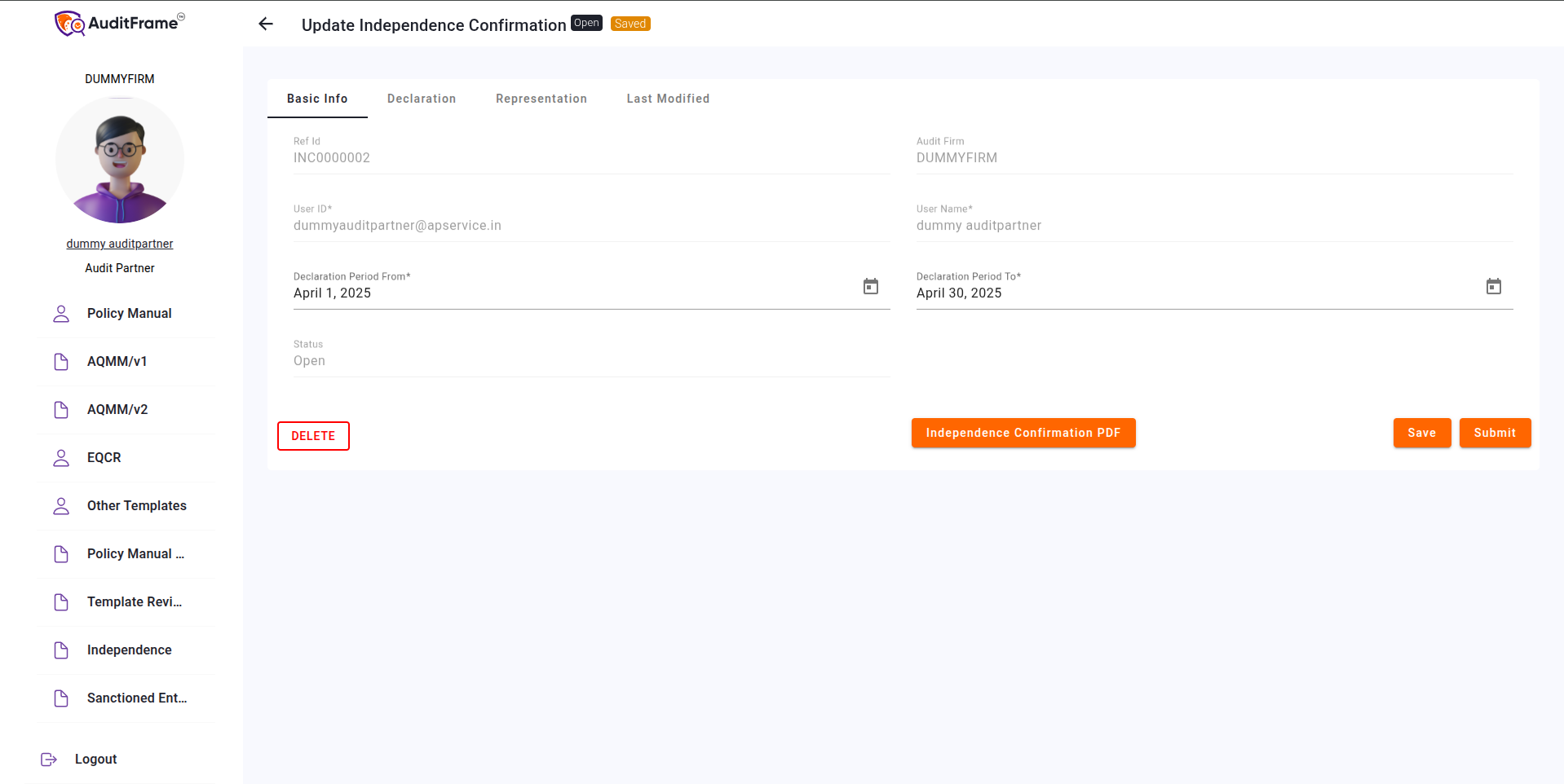
Independence Confirmation
Basic Info Permissions
Feature / Field
Audit Manager
Audit Partner
Audit Staff
Notes
Ref ID
Disabled(Read-Only)
Disabled(Read-Only)
Disabled(Read-Only)
Audit Firm
Disabled(Read-Only)
Disabled(Read-Only)
Disabled(Read-Only)
User ID
Disabled(Read-Only)
Disabled(Read-Only)
Disabled(Read-Only)
Auto Populate on Clicking New Button
User Name
Disabled(Read-Only)
Disabled(Read-Only)
Disabled(Read-Only)
Auto Populate on Clicking New Button
Declaration Period From
Disabled(Read-Only)
Disabled(Read-Only)
Disabled(Read-Only)
Only Enabled For Creator
Declaration Period To
Disabled(Read-Only)
Disabled(Read-Only)
Disabled(Read-Only)
Only Enabled For Creator
Status
Disabled(Read-Only)
Disabled(Read-Only)
Disabled(Read-Only)
Auto Change on Submit
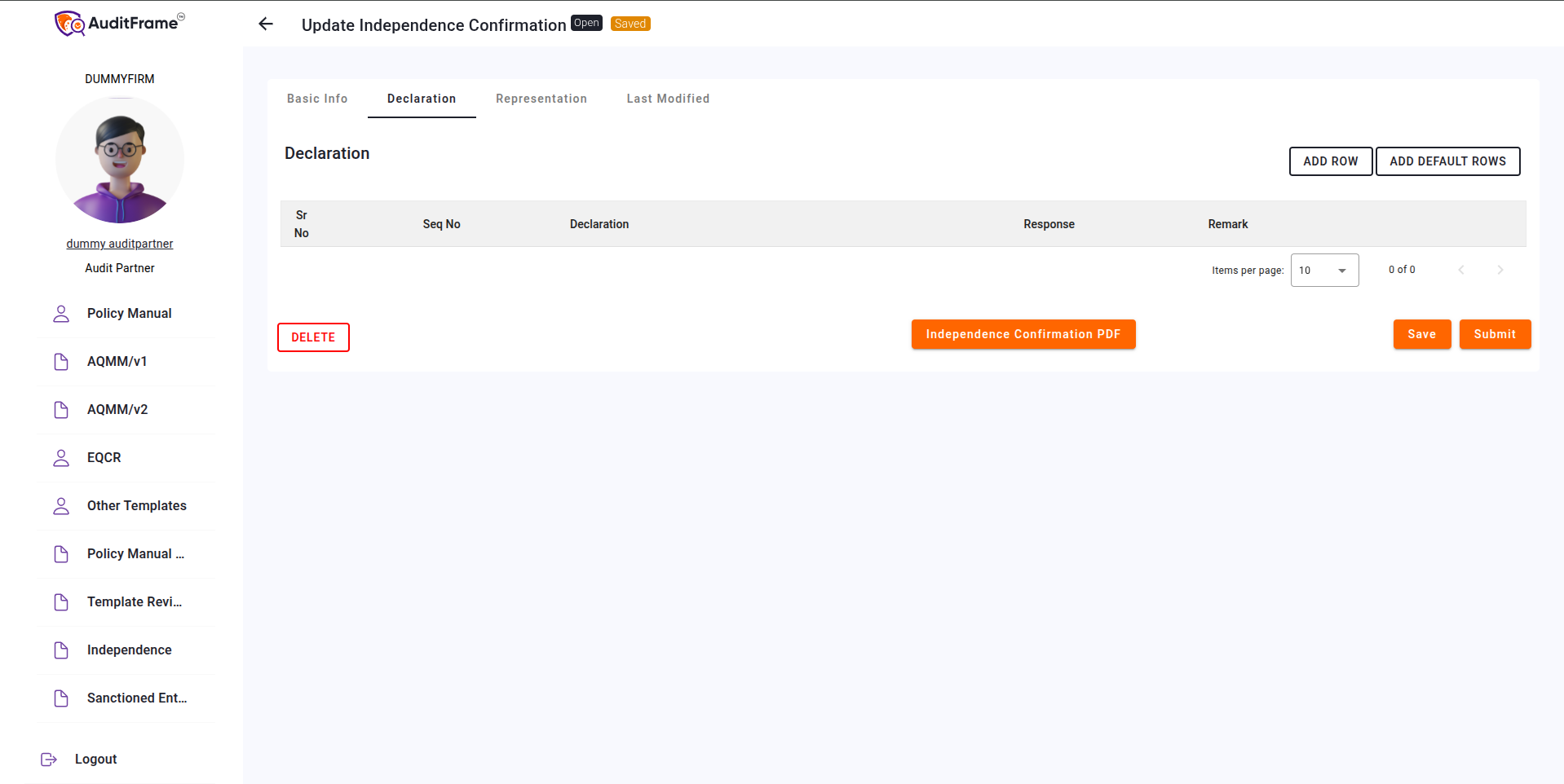
Declaration
You can add a default row by using the
'Add Default Row' button, or manually add a row by using
the 'Add Row' button.
Declaration
Declaration Table Permissions
Feature / Field
Audit Manager
Audit Partner
Audit Staff
Notes
Declaration Add Row Button
Hidden
Hidden
Hidden
Only Visible for Creator
Declaration Add Default Row Button
Hidden
Hidden
Hidden
Only Visible for Creator
Declaration Edit Button
Hidden
Hidden
Hidden
Only Visible for Creator
Declaration Delete Button
Hidden
Hidden
Hidden
Only Visible for Creator
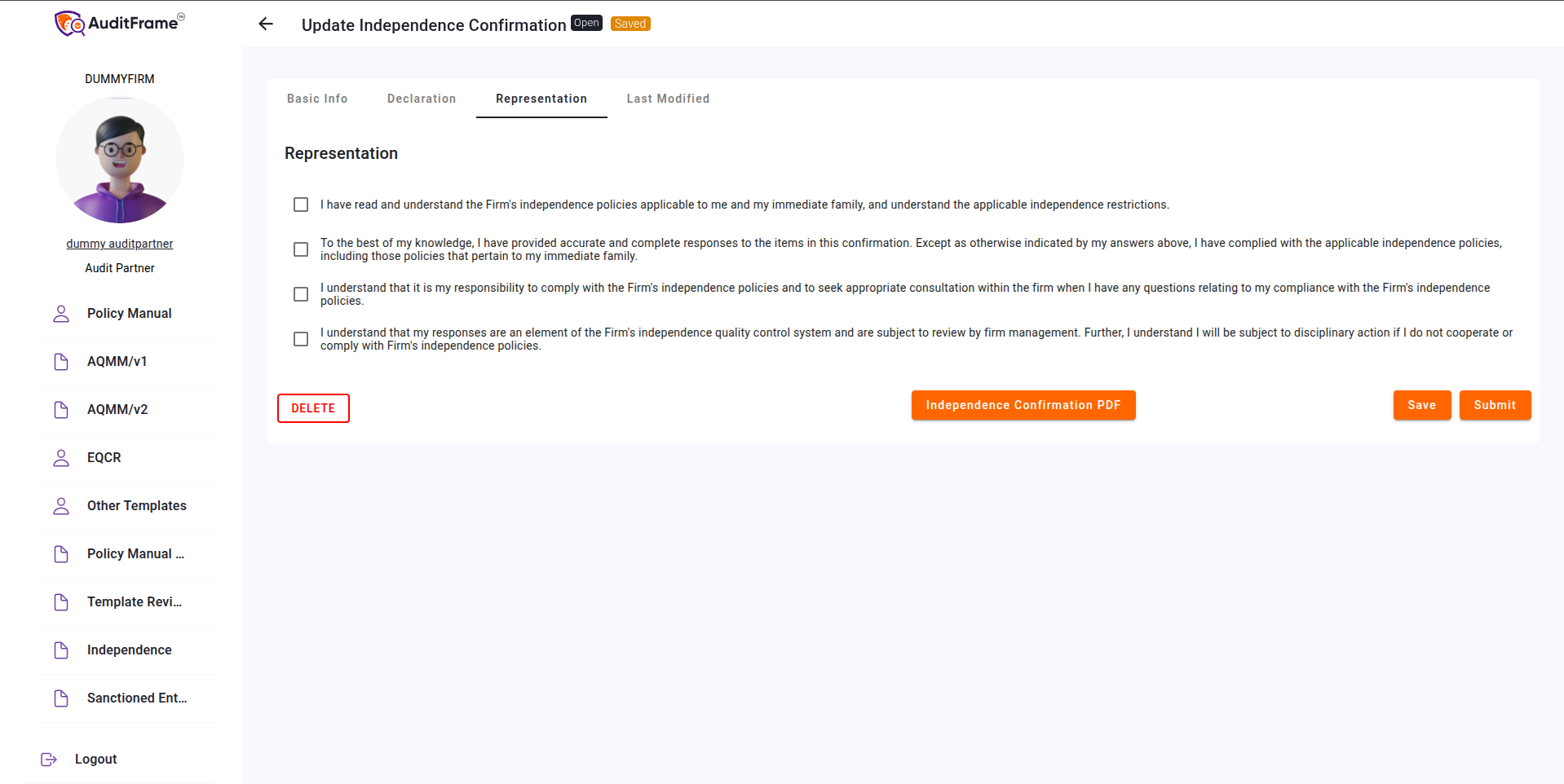
Representation
In this section, you can mark the relevant
Representation options as applicable.
Representation
Representation Permissions
Feature / Field
Audit Manager
Audit Partner
Audit Staff
Notes
Checkbox 1
Disabled(Read-Only)
Disabled(Read-Only)
Disabled(Read-Only)
Only Enabled For Creator
Checkbox 2
Disabled(Read-Only)
Disabled(Read-Only)
Disabled(Read-Only)
Only Enabled For Creator
Checkbox 3
Disabled(Read-Only)
Disabled(Read-Only)
Disabled(Read-Only)
Only Enabled For Creator
Checkbox 4
Disabled(Read-Only)
Disabled(Read-Only)
Disabled(Read-Only)
Only Enabled For Creator
Error You May Get
Error Message
Remedial Action
User ID is Mandatory
Provide the User ID before proceeding.
User Name is Mandatory
Provide the User Name.
Declaration Period From is Mandatory
Specify the start date for the declaration period.
Declaration Period To is Mandatory
Specify the end date for the declaration period.
Declaration Period To should not be earlier than Declaration Period
From
Ensure the "To" date is the same as or after the "From" date.
Only Creator can submit
Verify that the user submitting is the original document creator.
Declaration Table should not be empty
Fill out the Declaration Table before submitting.
Remark is mandatory if response to a declaration is Disagree.
Provide a reason or comment in the "Remark" field for all Disagree
responses.
All responses should be either Agree or Disagree.
Check that each declaration response is clearly marked as Agree or
Disagree.
All Checkboxes in Representation must be checked.
Ensure every checkbox under the Representation section is selected
before proceeding.
Global Actions & Document Operations
Permissions regarding the overall management of the Independence Confirmation.
Feature / Field
Audit Manager
Audit Partner
Audit Staff
Notes
Save Button
Hidden
Hidden
Hidden
Only Visible for Creator
Delete Button
Hidden
Hidden
Hidden
Only Visible for Creator
Submit Button
Hidden
Hidden
Hidden
Only Visible for Creator
PDF Button
Visible
Visible
Visible
Independence Confirmation
administrator edited 9 months ago
Independence Confirmation
Feature / Field
Audit Manager
Audit Partner
Audit Staff
Notes
Ref ID
Disabled(Read-Only)
Disabled(Read-Only)
Disabled(Read-Only)
Audit Firm
Disabled(Read-Only)
Disabled(Read-Only)
Disabled(Read-Only)
User ID
Disabled(Read-Only)
Disabled(Read-Only)
Disabled(Read-Only)
Auto Populate on Clicking New Button
User Name
Disabled(Read-Only)
Disabled(Read-Only)
Disabled(Read-Only)
Auto Populate on Clicking New Button
Declaration Period From
Disabled(Read-Only)
Disabled(Read-Only)
Disabled(Read-Only)
Only Enabled For Creator
Declaration Period To
Disabled(Read-Only)
Disabled(Read-Only)
Disabled(Read-Only)
Only Enabled For Creator
Status
Disabled(Read-Only)
Disabled(Read-Only)
Disabled(Read-Only)
Auto Change on Submit
Declaration Add Row Button
Hidden
Hidden
Hidden
Only Visible for Creator
Declaration Add Default Row Button
Hidden
Hidden
Hidden
Only Visible for Creator
Declaration Edit Button
Hidden
Hidden
Hidden
Only Visible for Creator
Declaration Delete Button
Hidden
Hidden
Hidden
Only Visible for Creator
Checkbox 1
Disabled(Read-Only)
Disabled(Read-Only)
Disabled(Read-Only)
Only Enabled For Creator
Checkbox 2
Disabled(Read-Only)
Disabled(Read-Only)
Disabled(Read-Only)
Only Enabled For Creator
Checkbox 3
Disabled(Read-Only)
Disabled(Read-Only)
Disabled(Read-Only)
Only Enabled For Creator
Checkbox 4
Disabled(Read-Only)
Disabled(Read-Only)
Disabled(Read-Only)
Only Enabled For Creator
Save Button
Hidden
Hidden
Hidden
Only Visible for Creator
Delete Button
Hidden
Hidden
Hidden
Only Visible for Creator
Submit Button
Hidden
Hidden
Hidden
Only Visible for Creator
PDF Button
Visible
Visible
Visible
Creating an Independence Confirmation
To create a new Independence Confirmation, click on
New from the list view. Fill in the required fields and
click the Create button to complete the process.
Independence Confirmation
Declaration
You can add a default row by using the
'Add Default Row' button, or manually add a row by using
the 'Add Row' button.
Declaration
Representation
In this section, you can mark the relevant
Representation options as applicable.
Representation
Error You May Get
Error Message
Remedial Action
User ID is Mandatory
Provide the User ID before proceeding.
User Name is Mandatory
Provide the User Name.
Declaration Period From is Mandatory
Specify the start date for the declaration period.
Declaration Period To is Mandatory
Specify the end date for the declaration period.
Declaration Period To should not be earlier than Declaration Period
From
Ensure the "To" date is the same as or after the "From" date.
Only Creator can submit
Verify that the user submitting is the original document creator.
Declaration Table should not be empty
Fill out the Declaration Table before submitting.
Remark is mandatory if response to a declaration is Disagree.
Provide a reason or comment in the "Remark" field for all Disagree
responses.
All responses should be either Agree or Disagree.
Check that each declaration response is clearly marked as Agree or
Disagree.
All Checkboxes in Representation must be checked.
Ensure every checkbox under the Representation section is selected
before proceeding.